Hey,
Not that much new fancy graphics or anything to show off today. Just that the internal audio / midi code is getting a needed clean-up and haul-over. Also some hard-coded MIDI mappings are in place, currently thinking about how to best implement the binding of the controls...
Some more engine class placement needs to be done before its all sorted out and neat, that's the main work. Its things like transfering ownership of audio buffers to the ResourceHolder class as opposed to each buffer being owned by a seperate "player" class, and no FX or other classes being able to use that buffer.
There should be a noticable performance gain once the changes are in place, as it rips out lots of unneeded signals & slots, and replaces them with a pointerToObject - > doIt () call. Sweet.
Also I've been messing with it recently, here's a little clip of a drum beat (.wav loop) and 3 layers of guitar + some live soloing going on:
LupppGuitarJam by HarryHaaren
Patiently waiting to get MIDI looping in place... :-) -Harry
Tuesday, March 22, 2011

Sunday, February 27, 2011
Luppp: Update Ambisonic... :-)
Hey,
Over the last week I've been implementing ambisonic support in Luppp. It didn't add up to too much work, only that JACK ports had to be named differently, the signal path adjusted somewhat (1 input, 3 outputs rather than 2 ins ,2 outs.
At the moment 2D horizontal B-Format ambisonic is supported, but implementing the 3D dimension of the first order wouldn't be too much work.. (add another channel to the process() functions.. )

The pan widget got a little haul over just to support 2D's rather than the one...
Till next, -Harry
Over the last week I've been implementing ambisonic support in Luppp. It didn't add up to too much work, only that JACK ports had to be named differently, the signal path adjusted somewhat (1 input, 3 outputs rather than 2 ins ,2 outs.
At the moment 2D horizontal B-Format ambisonic is supported, but implementing the 3D dimension of the first order wouldn't be too much work.. (add another channel to the process() functions.. )
The pan widget got a little haul over just to support 2D's rather than the one...
Till next, -Harry
Sunday, February 20, 2011
Luppp: Update Automation
Sup,
Productivity of today: Automation. Although the widget was already done, and the hard code in place, making it actually effect the parameters in the engine was a little tricky. It now communicates with itself internally (rather than the CPU expensive OSC beforehand). I've had lots of automation tracks running concurrently and there's no problems with performance that I can see. :-)

Here we have a couple of lines, unfortunaly I didn't record the output of Luppp while it was playing the lines, would have been nice...

Also created in the last weeks, a primitive MIDI editor... Clicky in notes, the engine plays them back (sample accurate... :-)
Currently not much can be done bar insert & clear notes. But with a bit of time that will all change...
Also new: Rather than 1 - 2 - 3 - 4 on the screen, I've opted for 4 circles to appear, each a different colour for each bar. Its as easy to follow and a bit more cheerful!
Bottom left of the screenshots there's a "Stop" & "Play" button, which make jack transport start / stop. Useful to not have to switch to QJackCtl everytime.
Till next, -Harry
Productivity of today: Automation. Although the widget was already done, and the hard code in place, making it actually effect the parameters in the engine was a little tricky. It now communicates with itself internally (rather than the CPU expensive OSC beforehand). I've had lots of automation tracks running concurrently and there's no problems with performance that I can see. :-)

Here we have a couple of lines, unfortunaly I didn't record the output of Luppp while it was playing the lines, would have been nice...

Also created in the last weeks, a primitive MIDI editor... Clicky in notes, the engine plays them back (sample accurate... :-)
Currently not much can be done bar insert & clear notes. But with a bit of time that will all change...
Also new: Rather than 1 - 2 - 3 - 4 on the screen, I've opted for 4 circles to appear, each a different colour for each bar. Its as easy to follow and a bit more cheerful!
Bottom left of the screenshots there's a "Stop" & "Play" button, which make jack transport start / stop. Useful to not have to switch to QJackCtl everytime.
Till next, -Harry
Thursday, February 3, 2011
Luppp: Update Waveform
Hey,
Today a "ResourceHolder" was implemented, it takes all buffers / MIDI / automation data, and stores it. Nothing else. But it means there's a centralized place from which both the GUI & the engine can access the data, and allows much easier plotting of data on screen... See attached:

So there's 3 piano wavs on the top 3 loopers, some drum & bass drums on strip 3. Breaks & noises on 4, leaves some synths on 5 :-)
All in all... happy that this got done, no clean solution came to mind since the last update, so its had been while in the pipeline.
Till next, -Harry
Today a "ResourceHolder" was implemented, it takes all buffers / MIDI / automation data, and stores it. Nothing else. But it means there's a centralized place from which both the GUI & the engine can access the data, and allows much easier plotting of data on screen... See attached:

So there's 3 piano wavs on the top 3 loopers, some drum & bass drums on strip 3. Breaks & noises on 4, leaves some synths on 5 :-)
All in all... happy that this got done, no clean solution came to mind since the last update, so its had been while in the pipeline.
Till next, -Harry
Sunday, January 16, 2011
Luppp : Update Funky
Hey,
Its a special day: 10,000+ lines.
Lots of work been done: UI got a real haul over, but under the bonnet there's a structure for automating data, and some initial multi-threading is going on to keep the RT thread doing what its supposed to!
The following shots nicely show off the funky new UI:

"Loopers", each one will* represent an audio loop, and provide some nice effects like reversing a part of the loop, swapping parts around & beat-grinding...

I've only 2 hands so automation is essential: take it away! Any parameter can be controlled via OSC! Working on an implementation of MIDI LEARN, to open access to every MIDI thing out there

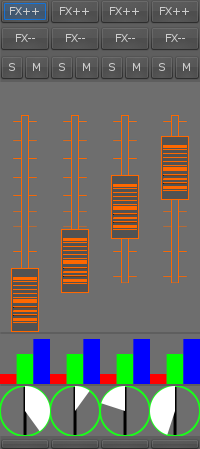
Finally (& most funky): The mixer.
Needs a little overhaul to not look your tripping, but basic features are there, the big orange is the fader, red-green-blue is a 3 band eq, under it the black line shows PAN (all 0 in shot).
Will post back when that 60's look is gone, -Harry
Its a special day: 10,000+ lines.
Lots of work been done: UI got a real haul over, but under the bonnet there's a structure for automating data, and some initial multi-threading is going on to keep the RT thread doing what its supposed to!
The following shots nicely show off the funky new UI:

"Loopers", each one will* represent an audio loop, and provide some nice effects like reversing a part of the loop, swapping parts around & beat-grinding...

I've only 2 hands so automation is essential: take it away! Any parameter can be controlled via OSC! Working on an implementation of MIDI LEARN, to open access to every MIDI thing out there

Finally (& most funky): The mixer.
Needs a little overhaul to not look your tripping, but basic features are there, the big orange is the fader, red-green-blue is a 3 band eq, under it the black line shows PAN (all 0 in shot).
Will post back when that 60's look is gone, -Harry
Wednesday, January 5, 2011
Luppp: Getting there
Hey all,
Serious progress going on! Audio input can be recorded (in time with the timebase) played back at a certain bpm (in sync with other files at the same bpm) effects can be applied to the signal stream (LADSPA only for now), and the resulting signals can be mixed with logarithmic faders, and finally the peak meters show you your levels ;-)

As you can see: there's a shiny "Add Track" button at the top of the screen, dynamically adds tracks to infinity...
The number in the left of the "track" widgets is its OSC ID, you'll need it to do things to that track!
The smaller numbers show how many beats there are in the loaded sample, and how many have elapsed.
The record button is there so you can enable..duh
The orange faders give volume control (with a log scale of x^3, feels nice with a MIDI controller ;-) Then the master output levels, and then the HUGE number to tell you what beat your on!
Next features: PFL on each mixer track, master faders, PFL faders, busses (sends), GUI interface to LADSPA effects (engine done :-)
Also needed: Some threading to allow RT thread not have to load / write audio samples, send large OSC messages etc. Working on it!
Cheers, till next! -Harry
Serious progress going on! Audio input can be recorded (in time with the timebase) played back at a certain bpm (in sync with other files at the same bpm) effects can be applied to the signal stream (LADSPA only for now), and the resulting signals can be mixed with logarithmic faders, and finally the peak meters show you your levels ;-)

As you can see: there's a shiny "Add Track" button at the top of the screen, dynamically adds tracks to infinity...
The number in the left of the "track" widgets is its OSC ID, you'll need it to do things to that track!
The smaller numbers show how many beats there are in the loaded sample, and how many have elapsed.
The record button is there so you can enable..
The orange faders give volume control (with a log scale of x^3, feels nice with a MIDI controller ;-) Then the master output levels, and then the HUGE number to tell you what beat your on!
Next features: PFL on each mixer track, master faders, PFL faders, busses (sends), GUI interface to LADSPA effects (engine done :-)
Also needed: Some threading to allow RT thread not have to load / write audio samples, send large OSC messages etc. Working on it!
Cheers, till next! -Harry
Sunday, December 19, 2010
Luppp: More features
Hey,
Luppp got its chrismas pressie early: Live audio input. As well as this, the start of a "timeline" class has been made, and this allows any recorded loops to stay in sync with eachother... :-)
GUI stuff has been deleted except for the re-usable stuff, and over the next while I intend to get some basic waveform & mixer widgets implemented. That is if i can stop myself recording all sorts of crazy sounds & looping them.
Till next, -Harry
Luppp got its chrismas pressie early: Live audio input. As well as this, the start of a "timeline" class has been made, and this allows any recorded loops to stay in sync with eachother... :-)
GUI stuff has been deleted except for the re-usable stuff, and over the next while I intend to get some basic waveform & mixer widgets implemented. That is if i can stop myself recording all sorts of crazy sounds & looping them.
Till next, -Harry
Subscribe to:
Posts (Atom)